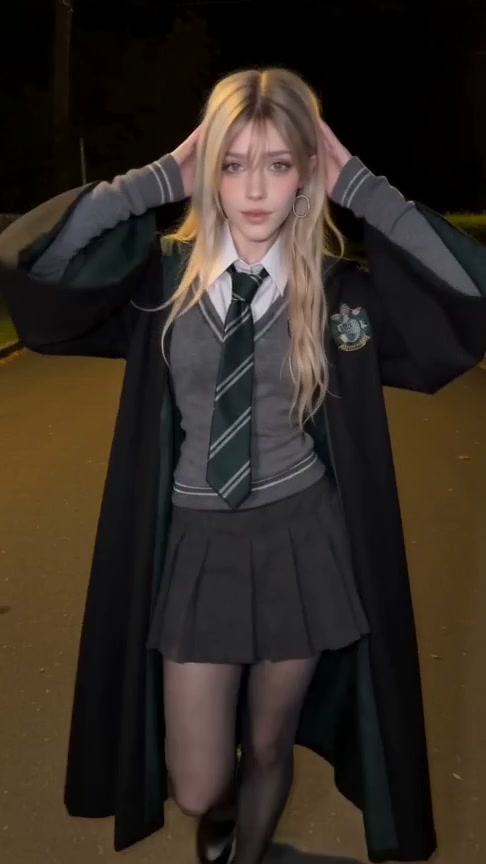
Want to make a Ramalama AI video from your own photo? Start with one clear, full-body portrait, preview the Ramalama Walk template, then generate an 11-second vertical clip. The camera begins low, follows the walk and rises to reveal the person's outfit and face. Download the finished video with music when it is ready.
Preview Ramalama Walk or open the studio.
What is the Ramalama AI video effect?
Ramalama Walk is a photo-to-video effect with a prepared camera move and motion reference. A person walks toward a low camera; the framing then lifts to the upper body, followed by the final hand gestures. Your photo supplies the person and their clothing.
The first version on Ramalama offers one person, one photo and one video format:
| Setting | Ramalama Walk |
|---|---|
| Input | One full-body photo of one adult |
| Length | 11 seconds |
| Format | Vertical 9:16 MP4 |
| Version | Fast, 480p |
| Generation price | 15 credits |
| Download | Video with template music |
The example shows the intended motion and framing. AI can change facial details, clothing details and gestures; a new result will not reproduce every frame of the example.
How to make a Ramalama AI video
1. Watch the example first
Open the Ramalama Walk template. Look at the walk, the camera rising from the shoes toward the face, and the ending. This is the effect you are choosing; you do not need to write a prompt or edit a timeline.
2. Choose one full-body photo
Use a photo of yourself or an adult who agreed to appear. Keep the face, hands and shoes visible, with enough space around the person to distinguish their outline. A clear front-facing photo in even light is a good starting point.
Avoid group photos, tiny faces, heavy filters, covered hands and cropped feet. The walk needs information about the whole body, so a close-up selfie gives the model less to work with. See our photo tips for more advice.
3. Sign in and check the credits
In the studio, add the photo and check the generation price before submitting. Ramalama Walk uses 15 credits per video. Credit packs are one-time purchases:
| Pack | Price in USD | Credits | Complete 15-credit videos |
|---|---|---|---|
| Starter | $9.99 | 30 | 2 |
| Creator | $29.99 | 100 | 6, with 10 credits left |
| Studio | $69.99 | 250 | 16, with 10 credits left |
You can browse the example without buying credits. Creating your own video is paid. The pricing page shows the available packs.
4. Generate, then download with music
Submit once. The photo goes through the generation provider's review before the render. Completion time depends on review and processing, so the 11-second output length is not a promise about how long generation takes.
You can return to your account to check the result. When it is ready, preview it and use the download option with music. Keep the vertical format when posting to Reels, Shorts or TikTok.
Tips for a better walk and reveal
- Show the entire outfit, including shoes. The first part of the effect focuses on the lower body.
- Separate the hands from the clothing where possible. Crossed arms and hidden fingers give the model less information.
- Use the outfit you want to appear in. The template follows the photo rather than providing a wardrobe selector.
- Choose an uncomplicated background and even lighting so the person's outline is clear.
- Inspect the face, hands and clothing before sharing. The example is a guide to the effect, not a guarantee of identical details.
Questions before you generate
Does the template change my clothes?
The prompt is designed to preserve the uploaded person's existing outfit. “Outfit reveal” describes the camera moving upward to show it. There is no outfit picker in this first version, and AI may alter small clothing details.
Can I use two people, a pet or 1080p?
This Ramalama template takes one adult in one photo. The first release offers Fast 480p only; it does not offer a two-person, pet or 1080p option.
What if generation fails?
Failed renders return their credits automatically. This is a return to your credit balance. For payment or purchase questions, contact support@ramalama.app and read the terms.
What if the page is still waiting?
Check your account's video history before submitting again. Leaving the page does not mean the render failed. If the status does not resolve, contact support rather than paying for a duplicate request.
Make your Ramalama walk
Choose a clear full-body photo, check the example and review the 15-credit price. Open Ramalama Walk to get started.